
Introduction
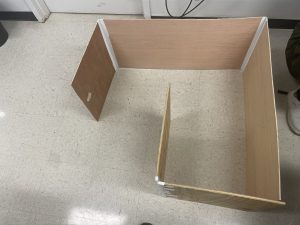
For my final project in my intro to engineering class I had to build a robot that could navigate a maze and put out a fire with a partner. We had to 3D print ways to mount motors to a robot body, two custom wheels for the robot and a third ping pong ball wheel. The robot also required an ultrasonic sensor so it could navigate the maze and a flame sensor to detect the fire. If you want to know more about what was expected please check out my previous blog posts on the motor mount and flame sensor.
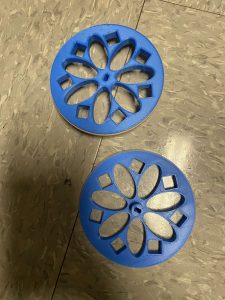
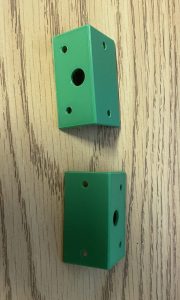
Our approach
Our approach to solving the problem was to build the robot first and then iterate the code to make it work. The first challenge we had to overcome was making the robot move. We created a system using two stepper motors to accomplish this. We had to integrate various sensors we had learned to use in our homework, so that the robot would be able to navigate the maze and detect the flame. So that the robot could put out the fire we had to design a system that could do so, this involved using a relay to control a fan on the robot. For a more detailed description of how the code for the robot works check out my partners blog post Almira Mamane.
 Design iterations
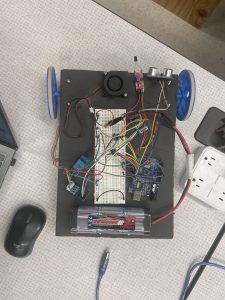
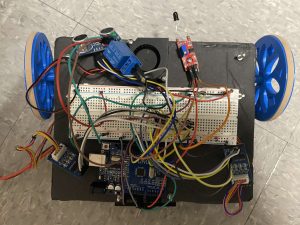
Our robot did go through several iterations while we designed it. Originally, we wanted the robot to look like a firetruck and have lights and a siren. However we were unable to do this because of time constraints. In the first physical iteration, (left) the robot was quite long and would back up when it saw a wall before it turned. This did not work because the robot would move forward when it turned and start backing up, which would cause it to get stuck going forward then backing up forever. So in the final version (right) we cut off the end of the robot and used this to to create a cage for the battery underneath and made it so the robot simply turned left when it saw the wall. Making the robot shorter improved the turning ability and not requiring it to back up fixed the getting stuck issue.
 The code
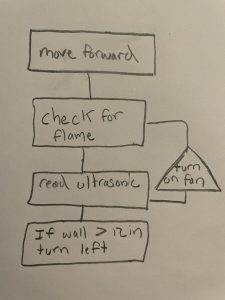
While coding the robot learned a few things, you should always start with a flowchart before starting complicated coding projects and having variables for your pin modes makes it much easier when you have to re-wire the whole robot because your breadboard broke. We created our own functions and imported some libraries so that the robot could function efficiently.
Conclusion and reflection
This project was very fun, and I learned a lot as it was my first real engineering project in college. If we had more time we definitely would have loved to improve on this design. Some examples of improvements that come to mind are making an algorithm that could solve the maze both ways and adding lights and a siren to make the robot how we originally envisioned it.
Here is a video of the robot solving the maze and “putting out” a flashlight because we did not have a lighter. Demo
Recent Comments